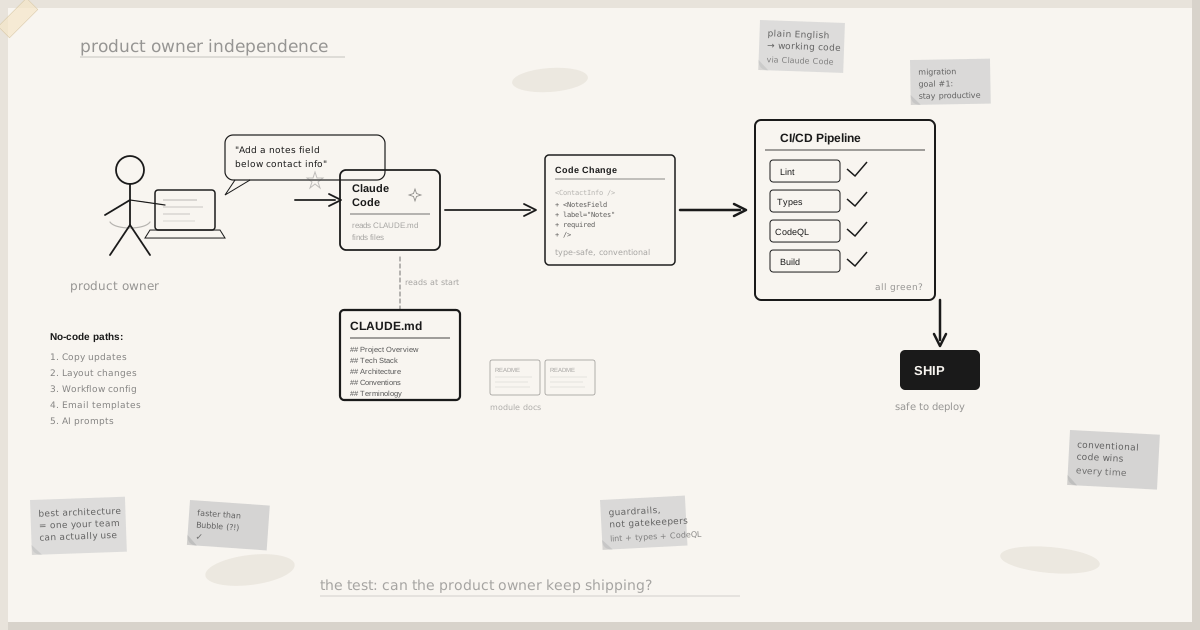

The real test of a migration isn’t whether the code is modern. It’s whether the product owner can maintain and evolve it without calling a developer for every change.
Migration Goal Number One
When we began planning the migration of an AI hiring decisioning platform from Bubble.io to a production tech stack, the product owner had one non-negotiable requirement: “I need to stay productive.”
Not “I need it to be fast.” Not “I need it to scale.” Those were requirements too, but they were table stakes. The existential requirement was independence. In Bubble, the product owner could change copy, adjust layouts, modify workflows, and manage content without waiting for a developer. Any migration that removed that capability wasn’t a migration. It was a hostage situation.
This requirement shaped every architectural decision that followed. Not the tech stack. Not the deployment pipeline. Not the AI layer. The product owner’s ability to ship changes without specialist help: that was the constraint that mattered most.
Any migration that removed the product owner’s ability to ship changes wasn’t a migration. It was a hostage situation.
The Conventional Codebase Advantage
There’s a persistent myth in software engineering that sophisticated code is better code. Clever abstractions. Elegant patterns. Metaprogramming that reduces twenty lines to three.
For a codebase that a non-developer needs to navigate, with AI assistance, the opposite is true. Conventional code wins. Every time.
The codebase uses clear, descriptive naming. A file called interview-summary-card.tsx contains the interview summary card component. A function called calculateApplicationScore calculates the application score. A folder called email-templates/ contains email templates. There are no abstractions to unwrap, no indirection to trace, no clever patterns that require understanding three other files before the current one makes sense.
This isn’t laziness. It’s a deliberate architectural choice. When the product owner opens Claude Code and says “change the text on the interview summary card,” the AI finds the right file immediately because the file name matches the request. When the product owner says “update the scoring logic,” the AI finds calculateApplicationScore because the function name is exactly what it sounds like. Readability isn’t a nice-to-have. It’s the mechanism that makes AI-assisted maintenance possible.
Five Contribution Paths That Don’t Require Code
The migration preserved, and in several cases improved upon, the product owner’s ability to make changes without touching code at all.
Copy and content updates. Marketing copy, help text, error messages, and UI labels live in clearly marked locations. The product owner navigates to the relevant component, finds the text, and changes it. No build step for content that’s embedded in components. For dynamic content managed through the admin portal, changes are instant.
Layout and styling adjustments. The design system uses utility classes with descriptive names. Changing a card layout from two columns to three, adjusting spacing, or modifying colours follows consistent patterns. The product owner describes the desired change to the AI assistant, which generates the exact CSS or component modification needed.
Workflow configuration. Business rules (application stage transitions, notification triggers, evaluation criteria) are configured through the admin portal, not hardcoded. The product owner adjusts these without any deployment.
Email templates. Every transactional email has a corresponding template file with clear structure: header, body, variables, footer. Changing what an email says or how it looks is a file edit, not a development project.
AI prompt management. All twelve AI features are managed through the admin portal. The product owner edits prompts, tests them, and ships changes without a developer or a deployment.
Five contribution paths that don’t require code. The product owner’s independence is a first-class architectural requirement, not an afterthought.
AI-Assisted Code Changes in Plain English
For changes that do require code (a new field on a form, a different sort order on a table, a conditional display rule), the product owner uses Claude Code. The workflow is:
1. Open the terminal in the project directory.
2. Describe the change in plain English: “Add a ‘notes’ field to the candidate profile page, below the contact information section.”
3. The AI reads the project’s CLAUDE.md file, understands the codebase conventions, finds the relevant files, and makes the change.
4. The product owner reviews the diff, runs the development server to check visually, and commits.
This works because the codebase is designed for it. Clear naming means the AI finds the right files. Minimal abstraction means the AI understands what it’s reading. Inline documentation of business logic means the AI doesn’t have to guess why something works the way it does.
The product owner doesn’t need to understand TypeScript. They need to understand their product: what it should do, what it should look like, what their users need. The AI handles the translation from intent to implementation. The codebase’s readability is what makes that translation reliable.
CLAUDE.md: The Onboarding Document That Never Gets Stale
Every conversation with Claude Code begins with the AI reading CLAUDE.md, the project’s ground truth document. This file contains the project overview, the tech stack with rationale, the architecture decisions, the domain terminology, the file structure, and the conventions that every change must follow.
For the product owner, CLAUDE.md serves a dual purpose. It’s the document the AI reads to understand the project. And it’s the document the product owner reads to understand the project. When the product owner forgets where email templates live, they check CLAUDE.md. When they need to understand why the notification system works a certain way, the rationale is documented there.
Critically, CLAUDE.md is maintained as part of the codebase. When the architecture evolves, the document evolves. It’s not a wiki that drifts out of date. It’s not a Confluence page that nobody updates. It’s a file in the repository that the CI pipeline can reference and that every AI conversation starts from.
Module Documentation: Self-Contained Knowledge
Beyond CLAUDE.md, each major area of the application has its own documentation. The requirements for each module (the interview system, the evaluation engine, the analytics dashboard) are documented in their respective directories. When the product owner needs to understand or modify a specific area, the relevant documentation is co-located with the code.
This co-location matters. A product owner asking Claude Code to “update how interview scores are calculated” benefits from a README in the scoring module that explains the current calculation, the business rules it implements, and the edge cases it handles. The AI reads that documentation and makes changes that respect the existing logic rather than introducing contradictions.
The mockup-first approach from the migration planning phase produces documentation naturally. Every page that was designed has a specification. Every specification describes what the page does, what data it displays, and what interactions it supports. That specification becomes the module’s documentation, not as a separate deliverable but as a natural byproduct of doing the design work properly.
CI/CD Guardrails: The Safety Net
Giving a non-developer the ability to ship code changes sounds terrifying to most engineering teams. It shouldn’t, provided the guardrails are in place.
Every change pushed to the repository triggers an automated pipeline:
Lint checks catch style violations and common errors. If the product owner’s AI-assisted change introduces inconsistent formatting or a missing import, the pipeline catches it before it reaches production.
Type checking ensures that changes don’t break the application’s type contracts. If a change to the candidate profile page accidentally removes a required field, TypeScript catches it.
CodeQL security analysis scans for vulnerabilities. If a change introduces a potential injection vector or an insecure data handling pattern, the pipeline flags it.
Build verification confirms that the application compiles and bundles correctly. No “it worked on my machine” deployments.
These guardrails mean the product owner can experiment confidently. Make a change. Push it. If the pipeline passes, the change is safe to deploy. If it fails, the error message explains what went wrong. The product owner fixes it, often with another AI-assisted change, and pushes again.
The deployment pipeline is the safety net that makes non-developer contributions viable. Without it, product owner independence would be reckless. With it, it’s routine.
The CI/CD pipeline is the safety net that makes non-developer contributions viable. Without it, product owner independence would be reckless. With it, it’s routine.
The Measure: Faster Than Bubble
The test isn’t whether the product owner can make changes. It’s whether they can make changes as quickly as they could in Bubble, or faster.
For content and configuration changes, the answer is clearly faster. Admin portal changes are instant. No Bubble editor load time. No “deploying to live” step. Change a prompt, test it, done.
For layout and code changes, the answer is “comparable, with better outcomes.” A copy change in Bubble takes thirty seconds. A copy change via Claude Code takes two minutes, but the change is version-controlled, type-checked, and deployed through a pipeline. The product owner trades thirty seconds of speed for dramatically better reliability and auditability.
For complex changes (adding a new field, modifying a workflow, changing business logic), the AI-assisted approach is often faster than Bubble. Describing “add a required ‘department’ dropdown to the job creation form with these options” to Claude Code produces a working, type-safe implementation in minutes. The equivalent in Bubble involves navigating the visual editor, adding elements, configuring conditions, and hoping the visual workflow doesn’t break something elsewhere.
The Responsibilities Transfer
The migration didn’t just transfer the application from one platform to another. It transferred operational responsibility. The product owner now owns:
Content and copy: direct edits, no intermediary.
AI behaviour: prompt editing through the admin portal.
Business configuration: workflow rules, notification triggers, evaluation criteria.
Routine code changes: AI-assisted modifications with CI/CD safety.
Release decisions: when to deploy, what to include, when to roll back.
The developer’s role shifts from “person who makes changes” to “person who builds capabilities.” The product owner makes day-to-day changes. The developer builds new features, optimises performance, and maintains infrastructure. Neither is blocked by the other. Neither is waiting for the other.
The Best Architecture Is the One Your Team Can Actually Use
Every architectural decision in this migration was filtered through a single question: can the product owner work with this?
Fancy abstractions that reduce code duplication but make the codebase harder to navigate? Rejected. Clever type-level programming that catches edge cases at compile time but produces error messages a non-developer can’t parse? Simplified. A deployment process that’s optimal for a DevOps engineer but opaque to a product owner? Redesigned.
The result is a codebase that’s perhaps less elegant than it could be. Functions are sometimes longer than a purist would prefer. Naming is sometimes more verbose than necessary. Documentation is sometimes redundant.
But the product owner can ship changes. They can describe what they want in English, review what the AI produces, and deploy with confidence. They’re not dependent on a developer’s schedule, a sprint cycle, or a ticket queue. They own their product in a way that no-code platforms promise but conventional development rarely delivers.
The best architecture is the one your team can use. Elegance that excludes your product owner is self-indulgence.
That’s the real test of a migration. Not “is the code modern?” Not “does it use the latest framework?” Not “would a senior engineer approve of the patterns?”
The test is: can the person who knows the product best keep evolving it? If the answer is yes, the migration succeeded. If the answer is “only with developer help,” you’ve built a more expensive version of the same dependency.