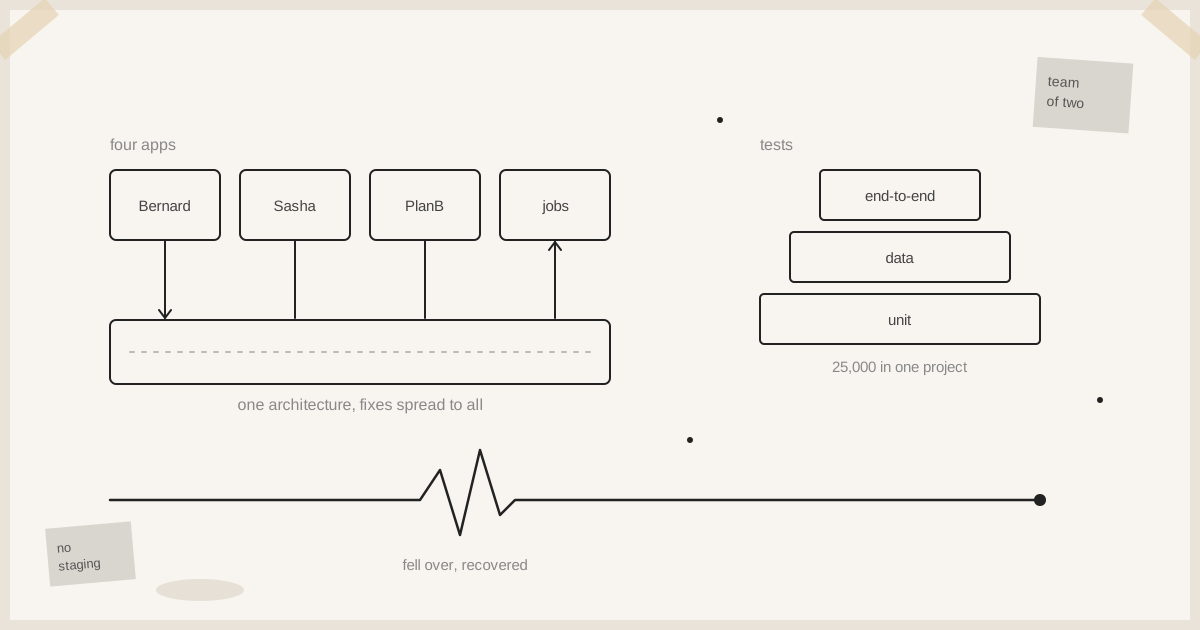
Four production apps. Live users. Two people. Here's why it holds together.
We run four production applications on the same architecture, including Bernard, Sasha and PlanB. Real users, real load, and we're smashing through features at a rate. People expect that to fall over regularly. It mostly doesn't.
So why is it stable? There are a few reasons. Some are textbook. Some go against what you'd traditionally be told.
1. We dogfood everything
This is the big one. Maybe a third of the reason things are stable.
We use what we build, all day. We see the errors and fix them before users see them. No ticket raised, developed, then deployed. You see it, you fix it.
Most teams find out about a bug when a customer reports it. By then it's already cost you something.
2. Some of our systems don't have staging
Our client systems have staging environments. For a bigger team, that's the right call.
Some of our own systems don't. We don't deploy to staging, check it's working, then push to prod. We check it locally and push.
Staging is a two-bladed knife. It gives you confidence things are working, but it's a different environment. There's a lot of work keeping the two in sync, and you get lazy. The workload doubles. Everything you check doubles. And you still get "it worked in staging" when prod breaks.
We get round most of that with Docker. The same containers run everywhere. The only differences between environments are environment variables, data and network.
There'll probably be staging on these systems one day. But right now we're moving, and it's not helpful. That's contrary to what people would traditionally say.
It only works because of what comes next.
3. Tests. Tons of tests.
I'd give us one out of ten for staging. Ten out of ten for test coverage. That's probably another third of our stability.
We test in layers: end-to-end tests at the top, unit tests at the bottom, and data tests alongside. Everything that gets developed gets a test. Test-driven development to the max.
One project alone has 25,000 test cases. A full run takes 40 minutes. We pay for that, in compute and in time.
I love them. They've saved us so many times. For the systems without staging, the tests are the staging environment.
One out of ten for staging. Ten out of ten for test coverage.
4. New features go to the guinea pigs first
Not sure if you'd call it canaries or guinea pigs. We release a feature, but it's locked to certain users. They use it, we check it's OK, then we open it up to more users.
That's probably 10% of our stability. We should do more of it.
5. The infrastructure recovers on its own
We run on AWS with an architecture built to recover. Containers fall over, but they recover. One night a database crashed. It fell over, it came back, it was fine.
It's not a fix for issues. It's a mitigation. But it helps.
6. Alerts that mean something
When we started, AWS alerts came in by the million. Over the last few weeks I've trimmed off the false positives.
Now when there's an alert, there's a 90% chance it's a real problem. If it's already recovered by itself, we got lucky. Either way, we look.
7. Four apps, one architecture
This one is a real advantage. All four apps run on the same architecture with the same design. When one finds a problem, we fix it in the architecture and apply it to all the others.
And they've all got different usage profiles, so they flush out different problems:
- One app runs massive long-running jobs. It flushes out problems with resource usage.
- Sasha runs in different environments, at different loads, with a very varied usage profile. It flushes out a different set of problems.
- Bernard runs at high load all the time.
All those different profiles give us really good signals. Then we cross-pollinate the fixes across every system.
8. Robots fix the small stuff
Small stuff gets reported by users, noted, and picked up by a robot. If it's small, it gets triaged and fixed automatically. We never think about it.
That frees up cognitive load. I've talked before about only having 500 cycles in a day. If 100 of those go on small stuff, that's 100 fewer for the big stuff. Auto-fix gives them back.
9. Function first. Then UX. Then looks.
We don't start with the design.
Anyone who's worked with a designer knows this. They'll design something beautiful and minimal and completely forget the functional requirements. Then the engineer comes in and says "yes, but you need an empty state, a dismiss, a filter." Then the designer comes back: "OK, but I want the filter to look like this and work this way." That's a lot of time lost.
Don't get me wrong. Usability, design, information hierarchy, the user experience, intuitive interfaces and beauty are critical. But they need to be applied at the right time. And the right time is to a working product that does what we want.
So we go in order:
- Does it do what you wanted it to do?
- Is it a good experience for the user? Is it intuitive?
- Then colour, type and beauty to sharpen the hierarchy on the page.
We get the engine working, then make it good. We don't try to do both at once.
"But AI writes your code. How can you possibly have control?"
AI labs now ship code at a volume that would have been unthinkable a few years ago. The obvious reaction is: that's crazy, how can anyone have control at that speed?
We're doing the same thing, and we are in control. I make every architectural decision. Every policy, every standard, every convention. This is a very opinionated place to work.
The machine is just operating within those decisions. It doesn't make them.
Make the decisions up front. Let the machine work inside them. Keep the judgement for yourself.
The short version
- Dogfood your product. You'll see the bugs first.
- If you skip staging, make your tests count. Containers help close the gap.
- Release to a few users before everyone.
- Build infrastructure that recovers on its own.
- Cut alert noise until every alert means something.
- Share one architecture so fixes spread.
- Let robots fix the small stuff so you can think about the big stuff.
- Make it work. Then make it usable, clear and beautiful.
None of this needs a big team. It needs discipline about where you spend your attention.
More on running production with a tiny team: I Don't Have an Ops Team. I Have Claude Code at the Terminal. and Coffee-Budget Software.