On Tuesday morning I opened the image picker in bernard and it sat on "Gathering your images..." for ages. The picker lists about sixty files. That takes under half a second. So something else was wrong.
The web servers were at 100% CPU. Not for a minute or two. From 08:15 to 10:40, and then again from 13:50 to 18:50. Pages took up to 28 seconds at the worst point. Nothing crashed and no request failed, which is part of why nobody noticed sooner (a slow site looks fine on a dashboard that only counts errors).
The cause was not visitors. A customer was importing a course with a few dozen lesson videos, and bernard was transcribing and indexing each video on the same two servers that serve everyone's pages.
The annoying part is that we had already built the fix. We designed a separate lane for video work months ago, built it, and never switched it on. The root cause was that we hadn't moved the video jobs off the app server as intended.
Two kinds of work
bernard does two very different things.
Most of it is requests. Someone opens a page, edits some text, publishes. That needs to be quick, because a person is waiting.
The rest is long jobs. Importing a whole website. Transcribing a video. Checking a thousand pages for accessibility. These take minutes or hours, nobody is sitting watching them, and they use a lot of CPU.
If you run both on the same machine, the long jobs win and everyone else waits. Our web servers are small (1 vCPU each, two of them), and they are sized for requests. One video transcription can keep a whole CPU busy for several minutes.
The rule we use now
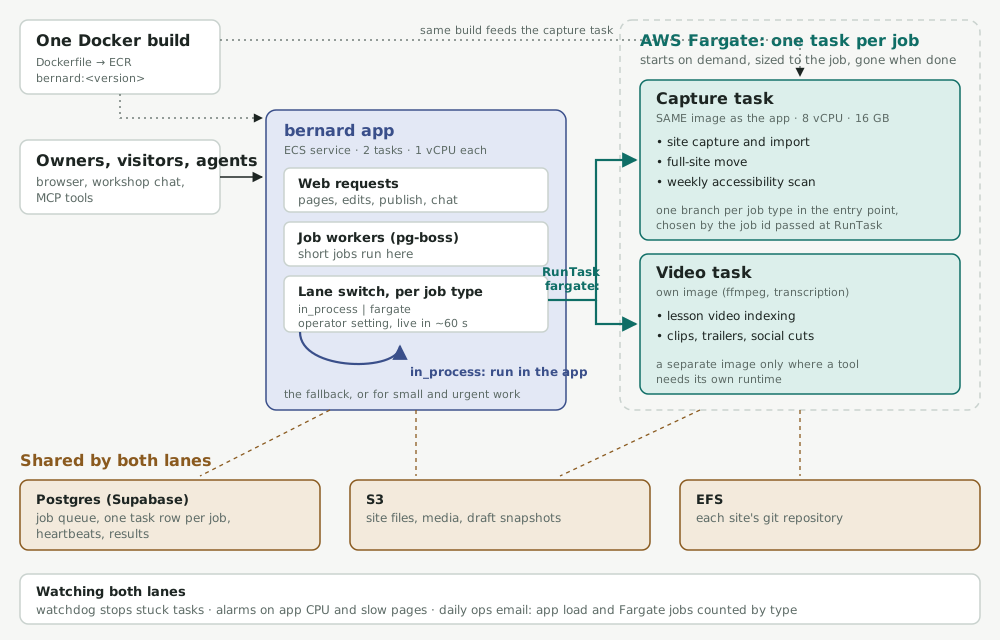
For every background job we ask three questions. Is it long? Is it heavy? Can it wait? If the answer is yes, it doesn't run on the web servers. It goes on a queue, and the queue starts its own task on AWS Fargate.
A Fargate task is a container that starts when the job starts and stops when the job is done. You pay for it while it runs and not otherwise. Each one can be a different size, so a site import gets 8 vCPU and 16 GB while the web servers stay at 1 vCPU.
In the last seven days bernard ran 92 of these: 69 site captures, 14 full-site moves, 6 video indexing jobs and 3 social clip jobs.
One build
This is the bit I like most, and it's the main reason the design stays simple.
The capture task runs the same container image as the web app. Same code, same Docker build, same dependencies. When the app starts a task it passes a job id, and the container's entry point looks at the job type and calls the right function. That function is the same code the app would run itself.
So there's no separate worker service to build, version and deploy, and no second copy of the logic drifting away from the first. Adding a new job type means adding one more branch. This week we moved the weekly accessibility scan onto Fargate that way: one branch, one database value and a setting. No new image, no new service, no new pipeline.
There is one exception. Video work runs on its own image, because it needs ffmpeg and transcription tools that have no business being in the web app. I'd rather have one exception with a clear reason than force everything into one container.
In the app or outside it
Every long job can run in either place. It's a setting per job type: run it in the app, or run it on Fargate. An operator can change it in about a minute without a deploy, and the same code runs either way against the same database, storage and site files.
That has turned out to be more useful than I expected.
- Rollout. A new lane starts switched off. We run it on our own test sites, compare the results with the in-app version, then flip it for everyone.
- Incidents. If Fargate has a bad day we can bring a job back into the app while we look.
- Fallback, decided per job. Video indexing falls back to the app on its own if a task won't start, because a customer is waiting for their lesson. The weekly accessibility scan doesn't, because nobody is waiting for it and falling back would put the load back on the web servers.
Why we do it this way
Simplicity, in the code and in operations. One codebase, one build, one deploy. The background work is ordinary app code. When something goes wrong there's one place to look.
Scale. The long jobs scale on their own. Ten imports at once means ten tasks, and the web servers don't notice. We size the web tier for traffic and nothing else.
Cost. Fargate bills by the second while a task runs. We don't pay for big web servers all day just in case a heavy job turns up, and every task is tagged with its job type, so the bill tells us what each kind of work costs. The alternative we looked at was autoscaling the web servers, and the database connection maths on our current database made that less attractive than it sounds.
I haven't got a measured saving to quote yet. The estimate for the accessibility scan is about 16 cents a run, and I'll put the real figure here once the first one has run.
Watching it
The other thing we got wrong was monitoring. Our CPU alarm couldn't tell "busy" from "flat out", and it had been flapping for days, so a five-hour slowdown didn't stand out.
Now the daily ops email has a load section: how busy the web servers were, how slow the slowest pages were, which alarms fired, whether any video work ran on the web servers, and a count of Fargate jobs by type.
The first time we ran the new load check, it found something nobody had spotted. The weekly accessibility scan, which renders every sampled page in a headless browser, had held the web servers at 78-93% CPU for fifty minutes at half past two in the morning. It had doubled in size because we'd added a lot of new sites that week. So we moved it to Fargate the same day (the change goes out with our next deploy).
The short version
- Work out which of your jobs are long, heavy and able to wait, and keep those off the web servers.
- Run them from the same build as your app, so you're not maintaining a second system.
- Make the lane a setting per job, so you can run it in the app or outside it, and choose the fallback for each job.
- Put load in a daily report, not only in alarms. Slow is easy to miss.
- Switch on the thing you built. We had this lane ready for months.