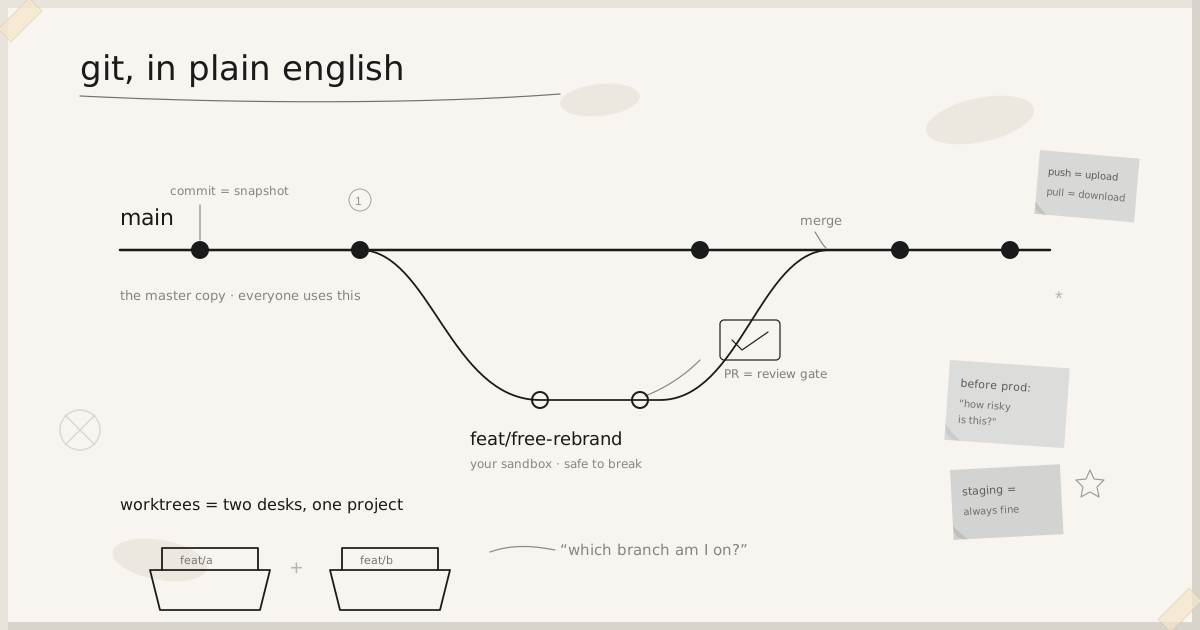

Git is the thing that keeps a complete history of the project and lets more than one person work on it without standing on each other’s toes. Think of it like the “version history” in Google Docs, except you decide when to take each snapshot, and you can have a private draft copy to experiment in before anyone else sees it.
This is written for non-developers who are building projects with Claude Code and working alongside me. You don’t need to memorise any commands. You need to recognise a handful of words when they come up, and know when to pause and ask a question.
The words you’ll keep hearing
A few words you’ll keep hearing, and what they actually mean:
- Commit: a saved snapshot of your changes, with a short note saying what you did. Nothing is “kept” until it’s committed. (Claude does this for you.)
- Branch: a separate copy of the project you can change freely without affecting the live version. It’s your sandbox.
- main: the one real, shared version of the project that everyone uses and that gets deployed. This is the “master copy”.
- Feature branch: a temporary sandbox copy, with a name like
feat/free-rebrand, where work-in-progress happens until it’s finished and checked. It keeps half-done work away from the master copy. - Push: upload your commits to GitHub so they’re backed up and others can see them.
- Pull: download everyone else’s latest changes onto your computer.
- PR (pull request): a request that says “my work is ready, please review it and fold it into main.” It’s the review gate before anything reaches the master copy.
- Merge: actually folding a finished, reviewed branch into main.
Am I on main or a feature branch, and why it matters
At any moment you’re “on” exactly one branch. To check, just ask Claude “which branch am I on?” (the command is git branch --show-current, but you don’t need to remember that).
If you’re on a feature branch (e.g. feat/something): good. This is the normal place to work. You can make changes, and they stay in your sandbox. They do not affect the live app or what other people see, even after you push. This is where all your editing should happen.
If you’re on main: be careful. main is the master copy. You shouldn’t be making edits directly here. If Claude ever has you on main and about to change something, stop and ask it to create a feature branch first.
main is the master copy. You shouldn’t be making edits directly here.
A real example from one of our projects: a document was committed on a feature branch but not on main. Anyone looking at main couldn’t see it, not because it was lost, but because it was still sitting in the sandbox. Once it was merged into main, a normal git pull showed it to everyone. That’s branches working exactly as intended.
Worktrees: having two branches open at once
Normally you have one copy of the project on your computer, and you flip that one copy between branches, like a single desk you have to clear off before you can start the next job. The catch: you can only be on one branch at a time, so if you’re halfway through a change and something urgent comes up, you’d have to stop and tidy the first thing away.
A worktree is a way around that. It’s a second folder on your computer that holds the same project but parked on a different branch. So you can have two pieces of work open side by side, one branch in each folder, without switching back and forth or losing your place. Think of it as a second desk: same project, different job laid out on each, both ready to work on.
It’s the same project in two folders, not a duplicate that can drift. Each folder just shows a different branch.
What this means for you in practice:
- It’s normal to see the same project appear in more than one folder. They’re not duplicates or copies that can drift apart, they’re the same project, each folder just showing a different branch.
- Each worktree folder has its own branch, so always check which branch you’re in (ask Claude “which branch am I on?”) before changing anything. The answer can be different in each folder.
- You almost never need to set these up yourself. Claude handles the mechanics; you just need to know the word so it’s not a surprise when work is happening in a separate folder.
When should I merge or deploy?
You can merge your own work into main and deploy it. You don’t have to wait for me. Merging is the moment a change goes from “my private draft” to “part of the real app”, and deploying is what pushes it live, so the thing that keeps it safe is knowing the risk before you do it.
Deploying to staging is always fine. It’s the test site, so push cosmetic fixes and prompt changes there whenever you like to see them running. The risk check is only for merging to main and going to production (the live app). Before you do that, ask Claude “how risky is this?” and Claude should tell you without being asked. Then:
- Safe changes (wording, prompts, small cosmetic tweaks): once you’ve checked it on staging and it works, merge and deploy to production freely.
- Riskier changes (anything that changes behaviour, or touches the database, login/permissions, billing, or the core engine): be deliberate. See it on staging first, and for the high-risk areas, loop me in before it goes live.
When is it safe to merge on your own?
Merge once the work is actually finished, you’ve looked at it and it works, and Claude has told you the risk is one you’re comfortable taking on your own.
If Claude flags something as high-risk, that’s not “you can’t.” It’s “get a second pair of eyes first.”
The CLAUDE.md that makes this work
None of the above is something you have to remember moment to moment. The risk check, the “ask before you run a command” habit, the staging-first rule: those live in a small personal instructions file called CLAUDE.md, and Claude reads it automatically every session.
This one is the personal file. It goes in ~/.claude/CLAUDE.md on your own Mac (create the ~/.claude folder if it doesn’t exist). It is not checked into the repository, because the project’s own CLAUDE.md already hands Claude all the technical rules. This file only covers who you are, how you work, and the load-bearing part: how Claude flags the risk of a change before you merge or deploy it.
Copy the whole block below into that file and adjust the bracketed bits for your project.
# Working with Claude on this project

## Who I am
I'm the product owner, not a developer. I know this product and its
domain inside out, but not the code. So:
- Explain decisions and trade-offs in plain business terms. When you have to
  mention code, tell me what it does, not how it's written.
- Don't assume I know git, the terminal, or our infrastructure. Walk me through
  any command before I run it, and tell me what it'll do.
- If I ask for something that's a bad idea, say so and explain why - don't just
  do it.

## What I usually change
Most of what I do is copy, wording, prompts, and small cosmetic tweaks. But I
can take a change all the way - commit it, merge it to `main`, and deploy it.
What keeps that safe isn't asking permission for everything; it's knowing how
risky a given change is before I do it. Telling me that is your job (see
"Before I merge or deploy" below).

## How work happens here (the discipline that stops us breaking things)
- Every change traces to a PRD. If there's no PRD for it, we write or update
  one first, then build. No free-styling features straight into code.
- Work on a feature branch, not directly on `main`. Help me create one, do the
  work there, then merge it when it's ready.
- I test it locally and look at it before merging. Show me how to run it and
  what to check. Evidence before "it's working."
- I can merge and deploy myself - but never blindly. Before I do, tell me the
  risk (next section).

## Before I merge or deploy to production - tell me the risk
Deploying to staging is always fine - it's the test site, no customers see it,
so I don't need a risk check for that (see "Deploying" below). The risk check
is for merging to `main` and deploying to production (the live app). Whenever
I'm about to do either, say - without me asking - how risky this change is and
why, in plain terms. Use these three levels:

- Safe (go ahead on your own): wording, labels, help text, prompt phrasing,
  small cosmetic tweaks. These only change what people see or read, can't
  corrupt data, and are easy to undo. Merge and deploy freely.
- Some risk (do it, but be deliberate): anything that changes behaviour rather
  than just text; a change touching several files or files I didn't expect;
  anything I don't fully follow when you explain it. Deploy to staging first,
  look hard, and if you're not confident, tell me to check with Lindsay.
- High risk (don't go solo - loop Lindsay in before merging or deploying):
  the database or migrations, login or permissions (auth / RLS), billing or
  pricing, the core engine or processing pipeline, or anything that changes
  how data is stored or who can see it.

If a change is "some risk" or "high risk", spell out what specifically could go
wrong and what I should check. When you're not sure which level it is, treat it
as the higher one.

## Deploying
There are two places to deploy:
- Staging - our test site, not seen by customers. I deploy here freely,
  especially cosmetic fixes and prompt changes - that's exactly what staging is
  for, and it's how I see a change running for real before it goes live. Don't
  treat a staging deploy as risky; just do it and tell me how to look at it.
- Production - the live app real customers use. This is the one where the risk
  level matters: safe changes are fine for me to push myself; for riskier ones,
  be deliberate, and for the high-risk areas loop Lindsay in first.

Always staging first, then production - see it on staging, confirm it looks
right, then promote. After either deploy, tell me how to confirm it actually
worked (the health check) and what to watch for.

## Safety (always, whatever the risk level)
- Never send test emails, texts, or notifications to real customer addresses.
  Only internal test addresses. If a flow might send something real, stop and
  check with me first.
- Never paste API keys or secrets into chat, and never commit a .env file.

## When you finish something
Tell me in one plain-English line what changed and what I should look at to
confirm it. If it closes something we were tracking, note it so it gets logged.
The load-bearing part is the three-tier risk framework. Claude states Safe, Some risk, or High risk unprompted before every merge or deploy, and you decide. The control is informed judgement, not a hard handoff: you keep the ability to ship, and Claude makes sure you never ship blind.