Pageviews tell you traffic. Funnel reports tell you where the business is leaking. Most SaaS founders ship the first and never set up the second. Here’s the business case, the technical setup, and the prompt that does all of it in an afternoon.
The Problem Nobody Notices Until It’s Costing Them
Open Google Analytics on any early-stage SaaS and you’ll see the same thing: pageviews up and to the right, session durations, bounce rates, traffic sources. All technically true. All operationally useless.
The question that matters is not “how many people visited.” It’s “of the people who visited, where did they fall off on the way to paying?” That’s a funnel. GA4 will not show it to you unless you build it.
The kind of question your analytics should answer in 30 seconds:
- 100 people landed on the homepage this week. How many signed up?
- Of the signups, how many connected their first app within the trial window?
- Of the activated users, how many clicked Subscribe on the pricing page?
- Of the people who clicked Subscribe, how many paid?
Every drop-off between those steps is money on the floor. If 80% of signups never activate, that’s a 5x leverage point on every dollar you spend on traffic. If 60% of Subscribe clicks never complete checkout, that’s a Stripe-flow bug or a pricing-page UX problem worth more than most of the features in your backlog.
GA4 has the data to answer all of this. The reason it doesn’t, by default, is that GA4 only auto-tracks pageviews. The events that define your funnel, sign_up, add_app, backup_scheduled, begin_checkout, purchase, don’t exist until you write the code that fires them. Every product is different, so Google can’t guess.
Every drop-off between those steps is money on the floor. If 60% of Subscribe clicks never complete checkout, that’s a Stripe-flow bug or a pricing-page UX problem worth more than most of the features in your backlog.
What good looks like
Five pieces need to exist for funnel reports to work.
1. A consent layer. EU/UK customers need a GDPR-compliant cookie banner before any analytics cookies fire. The naive implementation (load GA4 only after Accept) loses 30–50% of your traffic because most people don’t click. The right implementation is Google Consent Mode v2: load GA4 always, default every consent signal to denied, send anonymized “modeled” pings while denied, and flip to granted when the user accepts. GA4 then statistically models the missing data.
2. A typed event helper. A single track() function that’s the only sanctioned place to fire a GA4 event. No ad-hoc gtag(‘event’, ...) calls scattered across components. Sounds like over-engineering until the day someone fires signup in one place and sign_up in another and your funnel breaks silently.
3. The events themselves, instrumented at the moment the action succeeds, not when the page loads. sign_up fires when the server confirms the user was created, not when they viewed /signup. A /signup pageview tells you intent; a sign_up event tells you outcome.
4. Server-side event tracking from your billing webhook. Browser-side purchase events lose 15–30% of attributed revenue on mobile because the success-redirect tab gets closed before GA4 gets the ping. The fix is to also fire purchase from your Stripe webhook server-side using GA4’s Measurement Protocol, with the same transaction_id so GA4 dedups. This single change recovers about a fifth of your “lost” conversion data.
5. The funnel exploration in the GA4 console itself, a manual configuration step that defines the steps, time window, and breakdown dimensions you want to slice by.
None of this is hard. All of it is fiddly. Most teams skip it because the work looks bigger than the perceived value, until they have the data and realise they were guessing about customer behavior for the last 18 months.
The prompt
The five pieces above are exactly the kind of work a capable AI coding agent does well: well-defined scope, lots of small fiddly bits, mostly mechanical once the architecture is right. The hard part is the architecture, and that part fits in a single prompt.
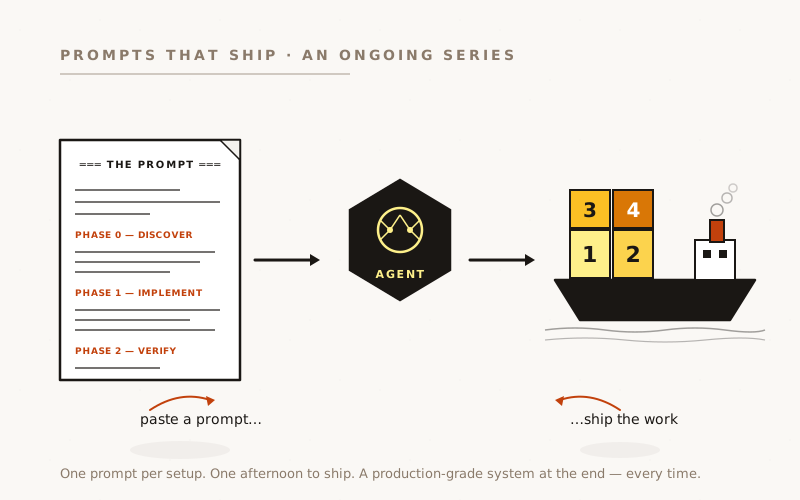
Paste this into Claude Code (or Codex). The first thing it does is discover your stack, so it works regardless of auth library, billing provider, or framework.
Set up GA4 funnel-tracking instrumentation for this app.
═══ PHASE 0 — DISCOVER FIRST ═══
Before writing any code, inspect the codebase and write your findings to
`docs/analytics.md`. Cover:
- Auth library and the shape of its state-change events.
(Our reference setup used Supabase Auth with @supabase/ssr;
your project may use Clerk, Auth0, NextAuth, etc.)
- Billing/checkout integration and the shape of its webhook events.
(Our reference setup used Stripe Checkout Sessions;
yours may be Lemonsqueezy, Paddle, etc.)
- Next.js routing approach (App Router vs Pages — affects the
loader pattern, Suspense requirements, and Server Action use).
- Whether GA4 is already loaded, and how
(raw next/script vs @next/third-parties/google).
- Any existing event tracking, dataLayer pushes, or analytics helpers.
Then write the implementation plan in the same doc. Stop. I'll confirm
before you implement.
═══ PHASE 1 — IMPLEMENT (after spec approval) ═══
1. CONSENT LAYER — Google Consent Mode v2.
- Load gtag unconditionally on every page.
- Push `consent default` with every signal set to `denied` BEFORE any
other gtag call (analytics_storage, ad_storage, ad_user_data,
ad_personalization, plus wait_for_update: 500).
- EXCEPTION: authenticated users get analytics_storage: granted as
the default (logged-in = implicit consent per the T&Cs — verify
that the privacy policy supports this).
- Cookie banner flips to granted via `gtag('consent', 'update', …)`
on Accept.
- Push `gtag('set', { send_page_view: false })` so the SPA pageview
tracker (next step) is the only firing point.
2. SPA PAGEVIEW TRACKER — `'use client'` component using usePathname() +
useSearchParams(), mounted in the root layout wrapped in <Suspense>
(useSearchParams forces CSR bailout otherwise). On every route
change, fire `gtag('event', 'page_view', { page_path, page_location })`.
STRIP THE QUERY STRING by default — token-bearing URLs like
/invite/accept?token=… and /auth/reset?code=… must not leak PII
into GA4. Add an allow-list for safe params (e.g. ?tab=…) only.
3. TYPED `track(event)` HELPER — single discriminated-union over the
event list. The ONLY sanctioned gtag('event', …) call site outside
the loader. Add a grep-based CI check banning bare gtag('event'
calls anywhere else.
4. FUNNEL EVENTS — instrumented at the moment the ACTION SUCCEEDS, not
when the page loads. Adapt the event names to this product. Ours
(a B2B SaaS) were:
- sign_up → after the auth library confirms account creation
- login → on auth state change (see #5)
- add_app → after the activation API confirms onboarding
- backup_scheduled → ON THE DISABLED→ENABLED TRANSITION of a
scheduling toggle. NOT every save — that
overcounts and the funnel becomes useless.
- begin_checkout → before the redirect to the billing provider
- purchase → both browser (best-effort, #8) AND server
(canonical, #7)
5. AUTH LISTENER — THE BUG THAT BIT US.
Subscribe to the auth library's state-change event. Fire `login`
on BOTH SIGNED_IN AND INITIAL_SESSION when a user is present.
WHY: server-action logins that redirect() after setting cookies
cause the post-redirect page mount to emit INITIAL_SESSION — NOT
SIGNED_IN. A listener handling only SIGNED_IN silently skips the
most common email/password login flow. This shipped as a real bug
for us; finding it cost a verification round-trip.
Dedup in localStorage (NOT sessionStorage — must persist across
tabs and refreshes) keyed to the auth user id. Clear on SIGNED_OUT.
6. CROSS-DEVICE STITCHING — after the listener fires, also call
`gtag('config', GA_ID, { user_id })` with the auth user's UUID.
Idempotent — fires on every page lifecycle.
7. SERVER-SIDE `purchase` via MEASUREMENT PROTOCOL — fail-soft helper
that POSTs to https://www.google-analytics.com/mp/collect from the
billing webhook on the "checkout completed" event. Recovers 15-30%
of revenue attribution that the browser fire misses on mobile
(tab closed before the success redirect lands).
Same transaction_id as the browser fire (the billing session id) so
GA4 dedups. At begin_checkout, capture the GA4 client_id via
`gtag('get', GA_ID, 'client_id', cb)` and persist it on the
checkout session's metadata. The helper MUST warn-and-return-false
on missing env vars, NEVER throw — billing webhooks must not 5xx
because of analytics.
8. POST-CHECKOUT SUCCESS-PAGE TRACKER — update the billing provider's
success_url to carry {SESSION_ID} (or your provider's equivalent
template variable) and the plan id. New <PurchaseTracker /> client
component reads them, fires track({ name: 'purchase', … }) once
(sessionStorage-dedup keyed to session id), then strips both params
from the URL with history.replaceState so they don't persist in
nav/share history.
9. TESTS at every layer. Loader behaviour, consent default values
reflecting cookie state, track() helper type-safety, auth listener
dedup logic, INITIAL_SESSION handling, server-side MP fail-soft
behaviour, browser purchase tracker URL self-cleanup.
10. PII DISCIPLINE. Never send email, name, IP, or any account/app
slug as an event parameter. The auth user UUID is the only
identifier permitted. Strip search strings from page_path.
═══ PHASE 2 — VERIFY before shipping each PR ═══
- Tests pass, type-check clean, lint clean.
- Manual smoke in a clean browser: no googletagmanager.com request
fires before banner-accept on anonymous pages; after accept, the
consent_update + page_view + login events land in GA4 DebugView
within seconds.
Ship in 5-6 small PRs, NOT one mega-PR. Each PR independently
deployable. Roll forward, not back.
Adjust the specifics to your product (replace the event list, swap our Supabase + Stripe + Next.js App Router reference for whatever your stack uses). The structure of the prompt is what does the work.
What the prompt is doing:
- Discovery first. Phase 0 forces the agent to read the codebase before assuming anything. It names our reference stack as a concrete example, then tells the agent to adapt to whatever’s actually there.
- Spec, not steps. The implementation phase tells the agent what good looks like, not how to build it. The agent picks the libraries, the component boundaries, the test surface.
- Spec-first ordering. Phase 0 ends with “Stop. I’ll confirm before you implement.” That single instruction forces a reviewable artefact before any files are touched.
- Anti-patterns called out by name. “Logged-in implies consent,” “fire on success not on navigation,” “handle INITIAL_SESSION not just SIGNED_IN,” “dedup login in localStorage,” “NEVER throw from the MP helper,” “strip the query string from page_path.” Every one is a bug we shipped and fixed.
- Explicit verification phase. Phase 2 closes the loop. Without it, agents hand-wave verification. With it, they write tests, run them, run the manual browser smoke, and only ship when both pass.
From this prompt the agent writes the consent gate, the SPA pageview tracker, the typed helper, the Stripe Checkout integration, the post-checkout success-page tracker with URL self-cleanup, the Supabase auth listener with INITIAL_SESSION handling, the server-side Measurement Protocol helper, the unit tests, and the documentation updates. Six PRs over an afternoon. Each one merges green.
The hard part is the architecture, and that part fits in a single prompt. The agent does the implementation; the human reviews decisions, not lines of code.
What goes wrong
Four gotchas bit us during execution that are worth knowing before you start.
Localhost-fired GA4 events sometimes don’t make it into the catalog.
During development we ran a Playwright walkthrough against localhost:4000 with the live GA4 measurement ID, to seed the events catalog so the funnel-picker autocomplete would populate. Five events fired with 204 OK responses. Only login showed up in GA4 a day later. The others (sign_up, backup_scheduled, begin_checkout, purchase) had been filtered or dropped. We had to re-fire every event from the production hostname for them to catalog.
Lesson: if you need to seed the GA4 catalog, drive the funnel against your production URL, not against localhost.
The funnel-picker autocomplete is 24–48 hours behind your event stream.
GA4 has three separate processing pipelines: Realtime (< 30 sec), Events report (1–24 h), and the picker autocomplete in Explorations / Audiences / Conversions (24–48 h). Events show up in Realtime almost instantly, in the Events report within hours, and in the funnel-builder dropdown the next day.
If you can’t find an event in the funnel picker, do not click the “Create event: ‘X’” suggestion. That creates a derived event that double-counts every hit forever. Wait.
Server-action logins fire INITIAL_SESSION, not SIGNED_IN.
Email/password login in a Next.js App Router app typically goes through a server action that calls signInWithPassword server-side, sets the auth cookies, and redirect()s to the dashboard. The post-redirect page mount sees the cookies and Supabase JS fires INITIAL_SESSION, not SIGNED_IN. If your analytics listener only handles SIGNED_IN, the most common login flow silently skips the login event.
We shipped the bug, found it during catalog verification, fixed it in a single PR, a sharp edge worth knowing about up front.
page_view as the first step of an Activation funnel drowns the signal.
GA4 funnel exploration counts users at each step. page_view fires on every visitor’s first page load, so making it step 1 of a 5-step funnel means step 1 ≈ “all users in date range” with a 95–99% drop to step 2. That collapses the visual scale and hides the conversion gaps you care about.
Build two separate funnels: an Acquisition funnel (page_view → sign_up) for answering “what % of visitors sign up” and an Activation funnel (sign_up → add_app → backup_scheduled → begin_checkout → purchase) for answering “of signups, where do they drop off.” Two narrow funnels beat one wide one.
What it costs
About four hours of an engineer’s attention spread across an afternoon. The agent does the implementation; the human’s job is to review the PRs, run the deploys, hit the manual GA4-console configuration (mark Key Events, set Reporting Identity to Blended, set data retention to 14 months, about 10 minutes of clicking), and verify in DebugView that the events land.
Under a day of work. The payback: the ability to look at your conversion funnel by source, by device, by country, by trial cohort, every Monday morning, for as long as the product exists. Every drop-off becomes a hypothesis. Every fix becomes measurable.
Why this matters
Most SaaS founders don’t ship funnel tracking because the setup looks like multi-week engineering work. It used to be. It’s now an afternoon with a coding agent. The question is no longer “can we afford to instrument this” but “can we afford to keep guessing about where the business is leaking.”
The question is no longer “can we afford to instrument this” but “can we afford to keep guessing about where the business is leaking.”
Built on PlanB, a Bubble.io backup service. Stack: Next.js 16 App Router, Supabase Auth, Stripe Checkout, GA4 with @next/third-parties/google, deployed to AWS ECS. The work was done with Claude Code (Opus 4.7) over a single afternoon, six PRs reviewed, merged, and deployed, with about 4 hours of human review and decision time on top.