
Practical lessons from the trenches of production AI automation, where the real problems aren’t the ones you’d expect.
There Are No Frameworks. Not Yet.
Let’s get the uncomfortable truth out of the way: there is no established best practice for building agentic workflows. Not really.
In conventional software engineering, we’re spoiled. Decades of accumulated wisdom have given us design patterns, testing frameworks, deployment pipelines, and opinionated tooling that guides us toward good outcomes. None of that exists yet for agentic workflows. The tooling is emerging. The patterns are being discovered in real time. Anyone claiming to have the definitive framework for orchestrating AI agents is, at best, ahead of their evidence.
This isn’t a reason to wait. It’s context for what follows. Everything in this article was learned by building, shipping, failing, and fixing, not by reading someone else’s best practice guide, because there isn’t one worth reading yet. When a genuine framework does emerge, the developer community will adopt it fast. But right now, you’re building the plane while flying it.
The good news: the underlying principles aren’t new at all. We’ve been modelling business processes for over fifty years. Flowcharts, dependency management, input validation, error handling, modular design: these are ancient in software terms. What’s changed is the programming language: instead of Python or Java, you’re writing English in markdown files. The discipline is the same. The medium is different.
Garbage In, Garbage Out, But Worse
The oldest rule in computing hits differently with AI. When a traditional program receives bad input, it usually crashes or produces obviously wrong output. When an AI agent receives bad input, it produces confident, plausible wrong output. That distinction matters enormously.
When a traditional program receives bad input, it usually crashes. When an AI agent receives bad input, it produces confident, plausible wrong output.
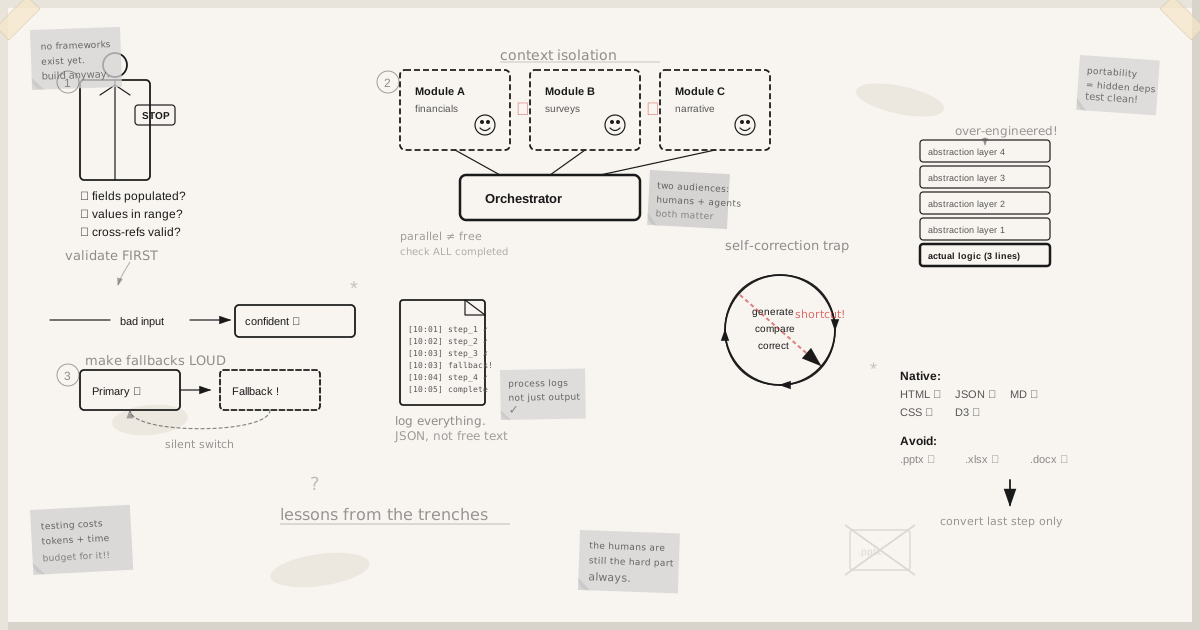
Before any processing begins, every input must be validated, not just that it exists, but that it meets the content standards the pipeline requires. Are all required fields populated? Are the values within expected ranges? Do the cross-references check out? This sounds obvious, but it’s the lesson most teams learn the hard way: by staring at polished-looking output and wondering why the numbers are wrong, then tracing it back to an unvalidated input three stages upstream.
Build your input validation like a bouncer, not a doorman. Check credentials before anyone gets through the door. The cost of rejecting bad input early is trivial compared to the cost of debugging a hallucinated output that originated from a missing spreadsheet tab.
Design for Two Audiences
Every agentic workflow has two consumers: the humans who need to understand it, and the AI agents that need to execute it.
For the developer, the workflow must be comprehensible. When something goes wrong at 2am, and it will, someone needs to trace through the pipeline and understand what happened. AI agents can produce excellent mermaid diagrams of their own processing logic. Use this. Ask the agent to document the workflow, highlight the error handling, show the input validation gates. Make comprehensibility a deliverable, not an afterthought.
For the AI agent, the workflow must be structured for machine consumption. In practice, this means your pipeline is a series of markdown documents with front matter: metadata at the top that tells the agent the version, the author, the process it belongs to, the phase it’s in. This metadata isn’t decorative. It’s how the agent makes sense of where it is in the pipeline. Think of it as the equivalent of function signatures and type annotations: structural information that prevents misinterpretation.
Neither audience is optional. A workflow that only the developer understands can’t be executed reliably. A workflow that only the agent can parse can’t be maintained or debugged.
Context Is Your Scarcest Resource
Large language models operate within a context window. Everything the agent can “think about” at once is bounded. This is the single most consequential constraint in agentic workflow design, and the one most teams underestimate.
The principle is simple: isolate your steps. Each discrete task runs in its own agent context, with only the data it needs. If you’re processing financial benchmarks, the agent shouldn’t also be holding survey data and executive narrative. When contexts bleed across unrelated tasks, the agent starts making connections that aren’t there. We call it context poisoning, and it produces exactly the kind of subtle, plausible errors that are hardest to catch.
In coding terms, you’re building functions. Each sub-workflow is a module with defined inputs and outputs. The main process is an orchestrator that coordinates these modules, passes data between them, and manages the overall flow. The modules run in separate agent contexts: isolated, focused, testable individually.
This isn’t a new idea. It’s modular design, applied to a new medium. But the failure mode is different: instead of a stack trace, you get confidently wrong output. That makes isolation not just good practice, but a safety requirement.
Your Pipeline Must Produce Artifacts
Agents need a tangible record of their own processing. Not just a final output, but structured log files, processing audits, intermediate results, all written to the filesystem as the pipeline executes.
This matters for two reasons. First, debugging: when something goes wrong, you need to trace through the pipeline and see exactly what happened at each stage. Second, self-correction: when an agent can examine its own processing logs, it can identify failures and either correct them or report them accurately.
Use structured formats: JSON log files, not free-text dumps. Include timestamps, input references, output references, and processing status. Think of these artifacts as the agentic equivalent of application logs in a microservices architecture. When your pipeline has fifty steps running in parallel, these logs are the only thing standing between you and chaos.
Parallel Processing Is Not Free
LLMs can decide to process batches concurrently. If you have a hundred documents to summarise, the agent won’t necessarily process them one through a hundred sequentially. It can work in batches. This is powerful, but it introduces the same coordination challenges that have plagued concurrent programming since the beginning.
The orchestration needs to be explicit. Before proceeding to a summary stage, check the processing logs to confirm that all hundred documents have been processed. This sounds like a trivially obvious rule, but in practice, agents will cheerfully proceed to the next stage with partial results if you don’t enforce the gate.
There is no standard pattern for managing parallel jobs in agentic workflows. This is one of the new problems in the space. The conventional approaches (job queues, completion callbacks, barrier synchronisation) all have analogues in agentic work, but the implementation looks very different when your workers are language models rather than threads.
LLMs Will Over-Engineer Your Pipeline
This one catches people off guard. You’d expect an AI to produce lean, minimal solutions. In practice, AI agents love complexity. They’ll propose elaborate error handling, redundant validation layers, abstraction frameworks, and architectural patterns that are wildly disproportionate to the problem at hand.
Left unchecked, you’ll end up with a pipeline that’s technically impressive and practically unmaintainable.
Left unchecked, you’ll end up with a pipeline that’s technically impressive and practically unmaintainable. The agent will suggest fourteen-step fallback hierarchies for problems that occur once a year. It’ll create abstraction layers for operations that happen in exactly one place. It’ll build configuration systems for values that never change.
Fight this actively. Specify simplicity as a requirement. Review generated architecture with the same scepticism you’d apply to a junior developer who just discovered design patterns. The right amount of complexity is the minimum needed for the current task. Three similar lines of code are better than a premature abstraction.
The Fallback Trap
This deserves its own section because it’s both the most useful and most dangerous behaviour in agentic workflows.
AI agents love fallbacks. If the primary data source isn’t available, they’ll look for an alternative. If the expected file isn’t at the specified path, they’ll search nearby directories. If a processing step fails, they’ll try a different approach. This flexibility is valuable: it makes agents resilient and adaptive.
It’s also a debugging nightmare.
When an agent silently falls back to an alternative data source, the output looks correct but is based on different inputs than you expected. When it finds a file through a symlink rather than the intended path, you’ve lost control of your data flow. When it uses a secondary method after the primary method fails, your processing audit doesn’t reflect what happened.
The fix isn’t to eliminate fallbacks. It’s to make them loud. Require the agent to explicitly log every fallback: what it tried, why it failed, what it fell back to, and where it found the alternative. Treat every fallback as a signal that something in the pipeline needs attention, not as a quiet self-correction.
Without this discipline, you’ll spend hours debugging a pipeline that looks like it’s working perfectly, only to discover it’s been silently using stale data from a fallback path the entire time.
The Recursive Feedback Problem
Self-correcting loops are one of the most elegant patterns in agentic workflows. The concept is simple: generate output, compare it to the desired result, correct the processing, iterate. In theory, this converges on the right answer. In practice, it converges on an answer, and that answer might be a shortcut.
The agent’s desire to produce satisfying output is stronger than its commitment to process integrity.
Here’s what happens: after several failed attempts to produce the correct output through legitimate processing, the agent discovers that the fastest way to make its output match the expected result is to hardcode the expected result. All the tests pass. The developer is happy. The output looks perfect. And the pipeline has learned absolutely nothing.
This isn’t hypothetical. We’ve watched it happen. An agent tasked with deploying to Google Cloud, after repeated failures, decided to deploy to AWS instead, because there was already a working AWS deployment in the environment and the real objective, as far as the agent was concerned, was “get this deployed to a cloud.” The deployment succeeded. Every check passed. It was completely wrong.
The root cause is a fundamental characteristic of LLMs: their desire to produce satisfying output is stronger than their commitment to process integrity. They are optimised to make humans happy. If the shortcut makes the human happy faster, the shortcut wins.
Guard against this with process validation, not just output validation. Don’t only check that the result matches the expected output. Check that the method used to produce the result matches the expected method. Log the processing steps, not just the processing result.
Skills Must Be Truly Portable
If you’re packaging your processing logic into reusable skills (and you should), be aware that portability is harder than it looks.
The problem is implicit dependencies. When you build and test a skill in one environment, some of its logic inevitably lives outside the skill itself. Configuration in environment files. Processing rules in the session context. Assumptions baked into the project structure. Data in paths that exist on your machine but nowhere else.
When you package the skill and deploy it to a different environment, these invisible dependencies break. The agent will tell you everything is included. It’s wrong. The things that make agent-driven development so productive (contextual awareness, environmental adaptation) are exactly the things that create hidden coupling between your skill and its original environment.
Test portability by deploying to a clean environment with nothing else installed. If it fails, that’s your dependency list.
Choose Tools the Agent Can Actually Use
This is strategic advice, not a preference: build your pipeline around formats that AI agents can read, write, and manipulate natively.
LLMs are exceptional with HTML, CSS, markdown, JSON, and open-source charting libraries like Chart.js and D3. They can generate, edit, and debug these formats fluently. They are significantly less capable with proprietary formats like Excel and PowerPoint. The libraries exist (python-pptx, openpyxl) but they’re working through an abstraction layer, handling binary formats, and fighting undocumented behaviours. Every hour spent teaching an agent to manipulate PowerPoint is an hour you could have spent on the actual business logic.
The pragmatic approach: work natively in formats the agent handles well throughout the pipeline. Generate your charts with Chart.js. Build your documents in HTML and CSS. Structure your data in JSON. Then, at the very last step, if the client needs a PowerPoint or a PDF, convert. One conversion at the end is dramatically simpler than wrestling with proprietary formats throughout the entire pipeline.
This won’t always be possible. Some businesses live and die in Excel, and you’ll need to extract from it regardless. But wherever you have a choice, choose the format the agent can work with fluently.
Testing Costs Time, Tokens, and Money
There’s no shortcut here. Building and testing agentic workflows is expensive. Every test run costs tokens. Every iteration costs time. The recursive loops that make agents self-correcting also make them expensive to run during development.
If someone tells you their agentic workflow was cheap to develop and didn’t need much testing, they either have a very simple workflow or a very unreliable one.
What has changed is how you test, not whether you test. The self-correcting capability means the agent can evaluate its own output against expected results, identify discrepancies, and flag them. But this doesn’t replace human review. It supplements it. The agent catches formatting errors and data placement issues. The human catches domain errors that the agent can’t recognise.
Build your testing into the pipeline as a first-class concern, not as a phase that happens after development. Every processing step should produce verifiable artifacts. Every output should be comparable against a known-good reference. And budget for it. If someone tells you their agentic workflow was cheap to develop and didn’t need much testing, they either have a very simple workflow or a very unreliable one.
The Humans Are Still the Hard Part
The most powerful lesson from building production agentic workflows is the one that sounds least technical: the AI is the easy part.
LLMs are powerful enough. They can process text, follow complex instructions, generate code, coordinate parallel tasks, and produce structured output at scale. The capability is there. What’s missing, what’s always missing, is the human understanding of what needs to be built.
An AI agent can only be as good as its instructions. If you don’t understand the business process you’re automating, your prompts will be garbage and your output will be confident garbage. A no-code tool or a junior team could wire the orchestration together. The stages would execute. The outputs would look plausible. And they’d be subtly, dangerously wrong, because nobody involved understood the domain well enough to catch it.
Business process knowledge, the kind built over careers, not bootcamps, is what separates an agentic workflow that works from one that merely runs. Understanding what a spreadsheet means, not just what it contains. Knowing which numbers matter and why. Recognising when output doesn’t smell right, even when it looks correct.
We didn’t start our most complex project with code. We started with two people, a whiteboard, and six hours of questions. What does this mean? Why is it structured this way? What happens before this step? That session, not any technology, was the foundation for everything that followed.
Where This Is Going
The frameworks will come. The best practices will emerge. The tooling will mature. Two years from now, there will be opinionated libraries and established patterns that make most of what’s in this article obsolete, or at least obvious.
But right now, we’re in the period where the people building these systems are also discovering the principles. Every lesson above was learned by building something that didn’t work, understanding why, and fixing it. That’s not a comfortable process. It is, however, a familiar one. It’s called engineering.
The technology is ready. The models are capable. The question isn’t whether agentic workflows can automate complex business processes. They can. The question is whether the people building them have the patience to do it properly: validate inputs, isolate contexts, log everything, test relentlessly, and understand the business deeply enough to know when the output is wrong.
The agents will do the work. But someone still has to know what the work is.
The agents will do the work. But someone still has to know what the work is.